

Types of Forex Orders: The Ultimate Beginner-to-Pro Guide
Financial markets move fast, and prices change every second. If you want to trade currencies successfully, you cannot just rely on good timing. You should have the know-how of entering and exiting the market properly. That is where forex orders come into play. Forex Orders are nothing more than instructions you give your broker. It is created to instruct your trading platform when, where, and how to execute a trade.
If you make the correct order type, you’ll have control of your entry price, your exit method, and the overall chance. It stops you making emotional decisions in the heat of the moment.
In this detailed guide, I’ll be explaining each of the major forex orders. You will discover how each order works, when you should use it and how to safeguard your trading capital like a pro.
Market Orders vs. Pending Orders: The Core Categories
Before we get into specific order types, it’s important to realize that practically all forex orders fit into two general categories:
- Market Orders (Focused on speed)
- Pending Orders (Focused on precision of price)
Here is a quick side-by-side comparison to help you understand the core differences:
| Feature | Market Order | Pending Order |
| Execution Speed | Immediate | Delayed until price level is reached |
| Price Control | Low (Best available price) | High (Specific price level set in advance) |
| Trader Priority | Speed of entry/exit | Precision and strategy |
| Execution Risk | Slippage during high volatility | The order may never get filled |
Now, let’s look at each of these categories in detail and their particular order type.
What is a Market Order?
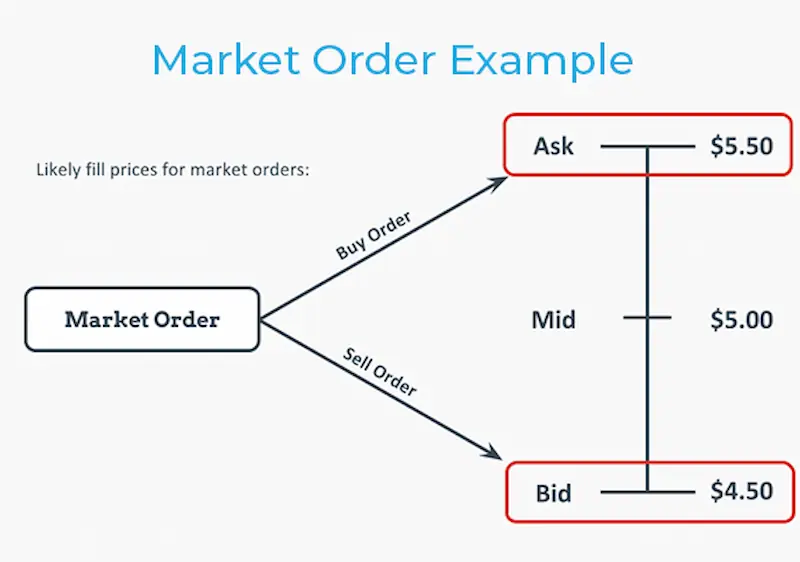
A market order is simply a request to buy or sell a currency pair at the going market rate.
With a market order, you value speed over price control. When you buy a stock, you are telling your broker, “Buy me this stock at whatever price it is at this moment.
How Market Orders Work
Suppose that the EUR/USD currency pair has a bid price of 1.2140 and the ask price of 1.2142.
- If you click Buy, your broker instantly fills your order at the ask price of 1.2142.
- When you click Sell, you will instantly sell at the Bid rate of 1.2140.
It works just like online 1-click shopping. You spot an item for sale; you click a button and it’s all yours.
When Should You Use a Market Order?
Market orders are best suited to the scenario of a trader who wants to enter or exit a trade ASAP rather than reaching for an ideal price.
Common scenarios include:
- Scalping: Scalpers are looking to hold a trade for seconds or minutes and want rapid execution.
- Market Orders: Day traders who trade off-of price action tend to use market orders if the price suddenly moves.
- Emergency Exits: If a trade goes really wrong, a Market Order will let you get out now to cut your losses.
- Breaking News: If a major update occurs, traders immediately switch on market orders to participate in an accelerating trend.
Understanding Slippage in Market Orders
Market orders will not always receive the price you observe on your screen. They merely ensure that you will get the best price possible at the moment your order is placed to the broker.
Your trade may close a few pips out of your target price if the market becomes volatile. This discrepancy is the one term that is termed slippage.
Example: During a major news release, you enter a EUR/USD buy order at 1.1250. When your order processes and your price jumps up, your trade will be filled at 1.1252. You paid 2 pips more due to slippage.
Slippage can happen both ways, but most often during low market liquidity or high impact news events.
Pending Entry Orders: Limit vs. Stop Orders
You can trade with pending orders, allowing you to plan trades ahead of time. You eliminate the need to watch charts all day and set up a buy or sell trade at a certain price point.
There are two primary groups of pending entry orders:
- Limit Orders (Buying low or selling high)
- Stop Orders (Buy high, Sell low on a break out)
Limit Entry Orders (Buy Limit & Sell Limit)
A limit order is an order to buy at a price lower than the current market price or to sell at a price higher than the current market price.
Limit orders are value oriented. They are used when you think the market is going to retest a significant price level.
1. Buy Limit Order
- Where to place it: Below the current market price.
- Market Expectation: You anticipate that the price will drop to a support level, then bounce off of it and continue to rise.
- Real-World Example: EUR/USD is at 1.1250. There is strong support at 1.1220. You set a Buy Limit at 1.1220. Your buy trade is activated automatically when price hits 1.1220.
2. Sell Limit Order
- Where to place it: Over the market price.
- Market Expectation: You think that the price is going to reach a resistance level and then reverse bearward.
- Real-World Example: EUR/USD is trading at 1.2050. If the price reaches 1.2070, you would want to sell short. You set a Sell Limit at 1.2070. Your broker takes an automatic sell order when the market reaches 1.2070.
Key Advantage of Limit Orders
A limit order guarantees that your trade will fill at your specified price or a better price. It will never fill at a worse price.
The Drawback of Limit Orders
It is not assured trading will open. When the price moves towards your order level, but then reverses early in trade, you know that this order was never filled and you missed a move.
Stop Entry Orders (Buy Stop & Sell Stop)
A stop entry order trades at a price higher than the current market price of the stock.
Stop entry order is an order that is based on momentum. You use them when you wish to trade with a conviction that the market is going in a strong direction.
1. Buy Stop Order
- Where to put it: On top of the existing market value.
- Market Expectation: You think that if the price moves past a resistance level it will continue to rise.
- Real-World Example: GBP/USD is currently at 1.3450. A move above 1.3480 will mark, in your opinion, a huge bull market breakout. You set a Buy Stop at 1.3480. Your trade will be open once the price crosses 1.3480 levels.
2. Sell Stop Order
- Where to place it: Below the current market price.
- Market Expectation: You think that if it falls below the support price level, selling pressure will intensify.
- Real World Example: EUR/USD is 1.11516. The low of 1.11506 is expected to cause a breakdown. You place a Sell Stop at 1.11506 to generate a sell trade in the wake of gaining momentum.
Buy Limit vs. Buy Stop: Clearing Up the Confusion
Many newcomers to the market may be confused by this as both a Buy Limit and a Buy Stop are buy orders.
Consider it in this manner:
- Buy Limit: You’ll buy a bear only if it’s on sale. You wait for the price to drop before buying.
- Buy Stop: You are paying an extra amount to confirm. You wait until the price shows it is rising before buying.
Risk and Exit Management Orders
When you open a trade it is only the beginning. That is what keeps your account alive knowing how and when to get out.
Risk management orders automatically limit your capital and capture your profits without you having to sit at your desk 24/7.
1. Stop-Loss Orders
Stop loss order type is an order that is attached to an open order to reduce the risk of loss on that order if the market turns against you.
If you are long (buy position), your stop-loss is a Sell Stop placed below your entry price. If you are short (sell position), your stop-loss is a Buy Stop placed above your entry price.
Example: You buy EUR/USD at 1.2230. To protect yourself, you set a stop-loss at 1.2200. When the price hits 1.2200, your broker will take the trade off automatically limiting your loss to 30 pips.
Always place a stop-loss when opening a trade. It eliminates fear and limits the risk of losing your whole account due to an unfavorable transaction.
2. Take-Profit Orders
Take Profit allows you to set price-level goals and automatically exit the trade when price levels are hit.
Example: You buy GBP/USD at 1.3500. You see resistance at 1.3600 that seems to be pretty good. You stop out at 1.3500. Once the pair reaches 1.3600, your trade gets automatically closed with a 100p profit.
Set Take Profit levels based on technical indicators such as support, resistance, or trend lines. Do not make numbers out of thin air.
3. Trailing Stop Orders
A trailing stop is a moving stop-loss order which follows the market as you make a profit from a position.
It is always a specific distance (in pip) from the average price in the market. As the market rebounds in your favor, so does stop-loss. In case of market turn the trailing stop locks at the same position.
Trailing Stop Step-by-Step Example:
- You sell USD/JPY short at 90.80 and set a 20-pip trailing stop (initial stop is at 91.00).
- Price drops to 90.60. Your trailing stop will automatically move to 90.80 (breakeven).
- The price continues to fall further, dropping to 90.40. While your Stop Loss stays at 90.60, you’ve completed 20 pips of profit.
- Price rallies back up to 90.60. After hitting the 20 pips profit mark, the trailing stop is set off, and the trade is closed.
Trailing stops are very effective when the prices are in strong trends.
4. Stop-Limit Orders
A stop-limit order is a hybrid of a stop and a limit order.
When the market reaches your set stop price, it will no longer be a market order. Rather, it becomes a limit order that takes orders at your limit (not higher).
Example: GBP/USD trades at 1.3450. You’re looking to buy a breakout above 1.3480, and you don’t want to give more than 1.3490. You place a Stop-Limit order at 1.3480 and 1.3490. Limit order will take effect once the price hits 1.3480. When the price jumps right on through 1.3490, the order remains unfilled, preserving you from huge slippage.
Order Duration and Validity: Time-in-Force (TIF)
When placing a pending order, you will also need to indicate the duration of time this order will be open for. This instruction is called Time-in-Force (TIF).
Here are the most common TIF parameters:
1. Good for the Day (GFD)
GFD orders are good to the end of the trading day. Your broker automatically cancels the order before the end of a session if it doesn’t execute. The majority of the brokers are closing trading day at 5:00 PM EST.
2. Good ‘Till Cancelled (GTC)
Opens a GTC order, which remains active until it is manually closed. Use GTC orders with caution. A pending order that was placed many weeks ago may activate much longer after your initial trade set up is long outdated.
3. Good Till Date (GTD)
The GTD order remains active for a specified date and time that you choose. This is ideal for when trades are set up before events such as interest rate updates.
4. Immediate or Cancel (IOC)
An IOC order should be executed as soon as they are given. If the order amount is not immediately available, the broker executes as much of the order as possible and cancels the remaining amount.
5. Fill or Kill (FOK)
An FOK order is an all-or-nothing instruction. The broker is required to execute the entire lot at the order price. If this is impossible, the platform cancels the order.
Advanced Conditional Orders (OCO & OTO)
Neither forex brokers provide advanced conditional orders. These orders require connecting two pending orders following certain outcomes.
1. One-Cancels-the-Other (OCO)
An OCO order is a pair of orders that are executed in sequence. When the market processes one order, the other order is automatically cancelled.
Example: EUR/USD is 1.2040. You are looking to purchase a breakout above 1.2095 or sell a breakdown below 1.1985. You make an OCO order which complements a Buy Stop at 1.2095 with a Sell Stop at 1.1985. When the price hits 1.2095, your buy position is open, and the broker immediately cancels your sell stop order.
2. One-Triggers-the-Other (OTO)
There are two orders: a Primary and Secondary order. Secondary order is passed after primary order has been executed.
Example: You place a Sell Limit on USD/CHF at 1.2100. Attached with it is an OTO Buy Limit of 1.1900. Your secondary Buy Limit will only enter the live market on the trigger of your primary of the Sell Limit at 1.2100.
Master Comparison Table: All 7 Main Order Types
Here is a master reference cheat sheet covering every order type:
| Order Type | Direction vs. Market Price | Execution Trigger | Best Used For | Primary Risk |
| Market | Current Price | Immediate | Instant execution | Slippage during volatility |
| Buy Limit | Below Current Price | Price falls to target | Pullbacks & Support | Order may never fill |
| Sell Limit | Above Current Price | Price rises to target | Rallies & Resistance | Order may never fill |
| Buy Stop | Above Current Price | Price breaks upward | Bullish Breakouts | Slippage after trigger |
| Sell Stop | Below Current Price | Price breaks downward | Bearish Breakdowns | Slippage after trigger |
| Stop-Loss | Exit Position | Price hits loss limit | Account Protection | Price gaps over stop |
| Take-Profit | Exit Position | Price hits profit target | Locking in gains | Target might not hit |
Step-by-Step: How to Place a Forex Order on Your Platform
Lots of it’s easy to place an order on major trading platforms. The typical work steps look like this:
- Open the Deal Ticket: Double-click your desired currency pair on the market watch window.
- Direction: Determine whether you are going Long (buy) or Short (sell).
- Select Your Order Type: Market Execution for immediate trade or Pending Order for future entry price.
- Set Your Price & Size: Enter in the desired size of your position (Lots) and entry price (for Pending).
- Attach Risk Controls: Fill in your Stop-Loss and Take-Profit price levels.
- Submit Order: Hit place order. Always verify in your platform’s live trading interface.
Best Practices for Managing Forex Orders
- Never Trade Without a Stop-Loss: Leverage means it amplifies profits and losses. Uncontrolled trading can affect an account within minutes.
- No Emotional Order Modifications: Keep your stop-loss where it is just because you want to hold on to a losing trade. Follow the original trade plan.
- Close Unused Pending Orders: Periodically close out old pending orders that may be redundant with the current market structure.
- Account for Spreads: Remember that buy orders execute at the Ask price, while sell orders execute at the Bid price. When you’re considering setting a limit or stop level, always take into consideration the broker spread.
Conclusion
Forex orders are far more than execution buttons on a screen. These are the very important things to let you trade with control and discipline.
Market orders are used when you want the purchase or sale to occur quickly. Pending orders and stop orders help you enter the market where you want. Once you set a stop-loss level and take-profit point, it automatically manages risk.
Maintain a transparent ordering process and stick to it. Match order types with overall trading plans, handle leverage responsibly, and allow orders to uphold discipline for each and every trade.
FAQs
What is the main difference between forex trading and forex order?
Order represents a command you give to your platform. That will only become an active trade when the market signals and initiates that trade.
Can I cancel or change a pending order after placing it?
Yes. During the period any of the orders is still pending, it may be adjusted or terminated at any time. After an order is loaded and turns into an open trade, it may only be managed by closing it or changing the extent limits.
Why did my stop-loss order execute at a worse price than I set?
This occurs when there is a trading glitch such as a ‘market leak’ or due to slippage on high volatility events. If the price skips your stop price, the platform will place your trade at the next possible market price.
Which forex order type is best for beginners?
If you are new to the game, it is best to avoid buying really complicated items. It is best to use pendings along with fixed levels at stop loss and take profit. It provides trading discipline without making panic decisions.
How do Time-in-Force instructions help manage trade risks?
Time-in-Force settings prevent forgotten pending orders from executing weeks later when market conditions have completely changed.
Also read: Forex Scalping Strategies: Fast Trades, Fast Decisions